In Codex
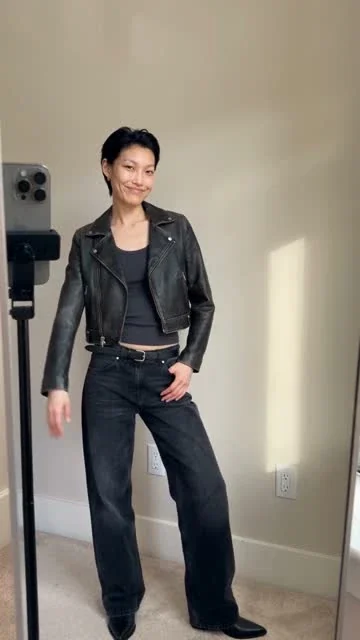
Use ChatCut to create a 15-second, 9:16 mirror outfit try-on with this presenter photo. Build a look with a cream cotton shirt, navy wide-leg jeans and a tan jacket. Show the credit estimate before generating.
Create a video of a presenter trying on an outfit or shoes, using clothing descriptions or the template's requested photos.
On-Foot Try-OnPro
What happens next
The result is a generated try-on video. Generation needs a paid plan and credits, with an estimate before the run. Try-on inputs and steps







Trusted by 400,000+ creators
Choose a mirror outfit sequence, an on-foot shoe preview or a package-to-outfit reveal.
Give shoppers a short visual introduction to a look, a pair of shoes or a new clothing drop.
Describe the garments, colors and materials for a step-by-step mirror try-on with your selected presenter.
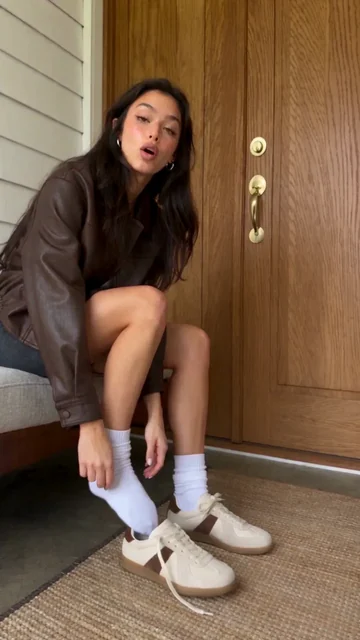
On-Foot Try-On uses shoe photos and a presenter to create a video showing footwear details and the shoes being worn.
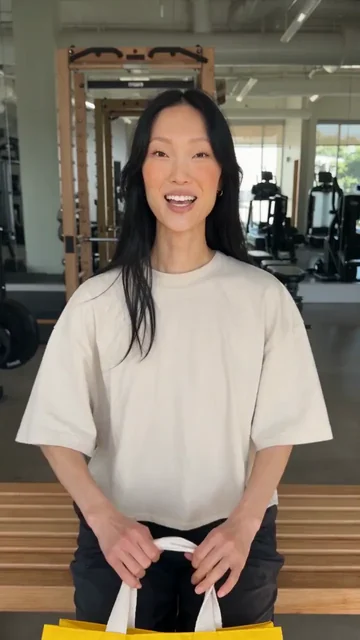
Supply garment and packaging images for a short sequence that starts with unboxing and ends with the clothes on.
Bring the video into a ChatCut project to trim it, add captions and arrange it with other product footage.
Choose the scene first, because each template asks for different clothing inputs.
Pick Mirror outfit try-on, On-Foot Try-On or Unbox and try on, then select the presenter the form asks for.
Describe the mirror outfit, add shoe photos for On-Foot, or provide garment and packaging images for Unbox and try on.
Continue to ChatCut, sign in and review the estimate before generating, then compare the clothing details and edit your clip.
Choose the scene that matches the part of your collection you want viewers to notice.
Describe a layered outfit, including colors and materials, and show the look coming together in a mirror sequence.
Use your shoe photos for an on-foot preview, with direction about the visible details you want to highlight.
Turn garment and packaging photos into a short arrival story, from opening the bag to showing the outfit on.
Connect ChatCut in Codex or Claude Code and describe the clothing, scene and output you want.
In Codex
Use ChatCut to create a 15-second, 9:16 mirror outfit try-on with this presenter photo. Build a look with a cream cotton shirt, navy wide-leg jeans and a tan jacket. Show the credit estimate before generating.
In Claude Code
Use ChatCut to make a 10-second, 9:16 On-Foot Try-On from these shoe and presenter photos. Show the laces, side profile and sole. Do not claim comfort or performance benefits. Show the credit estimate before generating.
Also on Grok and Antigravity. See all plugins.
Your result lands in a ChatCut project. Trim it, add captions, a voiceover or music, then export. Manual editing and export do not use credits.
100+ Skills. No experience needed. Start in one click.
Unlock member features, models, and export allowances. Get more credits every month
Billed annually · $252
16% offBilled annually · $456
24% offBilled annually · $864
28% offBilled annually · $1692
30% off$0No credit card required
Some features are completely free in Codex, Claude, and WorkBuddy. Learn More
| Credits per month | Monthly | Annual |
|---|---|---|
| Starter · 100 credits / month | $25/month Billed monthly | $21/month $252 · Billed annually |
| Plus · 200 credits / month | $48/month Billed monthly | $38/month $456 · Billed annually |
| Pro · 400 credits / month | $92/month Billed monthly | $72/month $864 · Billed annually |
| Max · 800 credits / month | $180/month Billed monthly | $141/month $1692 · Billed annually |
| Max · 1,200 credits / month | $270/month Billed monthly | $211/month $2532 · Billed annually |
| Max · 2,000 credits / month | $450/month Billed monthly | $351/month $4212 · Billed annually |
These templates generate short videos of a presenter trying on clothing or shoes. Choose a mirror outfit sequence, an on-foot shoe preview or an unboxing that ends with the outfit on. This page does not offer a still-photo outfit replacement tool.
Choose Mirror outfit try-on, select or upload a presenter photo, and describe the garments, colors and materials. Continue to ChatCut to sign in, check the estimate and start the run. This page prepares your choices without uploading files or charging your account.
Unbox and try on accepts garment and packaging or shopping-bag images alongside the presenter. On-Foot Try-On uses shoe photos and a selected presenter. Mirror outfit try-on uses a presenter image and written outfit details, rather than garment-photo uploads.
Choose On-Foot Try-On to generate a footwear video from your shoe photos and selected presenter. It shows the shoes being worn and highlights their details. It creates a new video rather than swapping shoes in an existing photograph.
Yes, Unbox and try on is designed for that sequence. Provide clothing and packaging images, choose a presenter and describe the details to emphasize. Review the garment and packaging in the generated result before exporting.
Mirror outfit try-on and Unbox and try on offer 5, 10 or 15 seconds at 720p in 16:9, 9:16, 3:4, 1:1 or 4:3. On-Foot Try-On also generates at 720p, with whole-second durations from 4 to 15 seconds and the additional 21:9 shape. Use the selected form's settings for the scene you want.
No, video generation requires a paid ChatCut plan and consumes credits. Review the estimate in ChatCut before you run it; every redo is a new paid task. Manual editing, adding captions and exporting do not consume credits.
Yes, bring the result into a ChatCut project to shorten it, add captions or arrange it with other clips. Manual timeline edits do not require generating the video again. Asking for a new generated take is a separate paid job.
Follow the Codex setup guide, or connect ChatCut in Claude Code, then share the outfit brief and required photos. The plugin does not install into the ChatGPT or Claude websites. Hosted generation uses your ChatCut plan and credits, alongside the host agent's separate allowance.
No, these templates make promotional try-on videos rather than measuring a person's body or calculating clothing size. Use them to show a look or product detail. Check colors, materials, logos and garment shape against your real product before publishing.
Guides: Product ads and try-on guide · All Skills
AI apps
Convert & compress
Edit video
Audio & voice